
Activities
About the Activities Module
The Pure Activities module is now available for all UNE researchers. Use it to record research activities including external HDR supervision, community engagement, conference presentations, exhibitions, editorial work, peer review, consultancies, and professional affiliations.
Link your activities to related publications to create a comprehensive narrative of your research work. Once the PURE projects module is available (later in 2026), you'll also be able to link activities to your research projects.
Researcher Resources
Activities Quick Start Guide – A PDF outlining different activity types with screenshots showing how to enter an activity
Step-by-Step Video – A detailed video demonstration of how to enter an activity
What can you record?
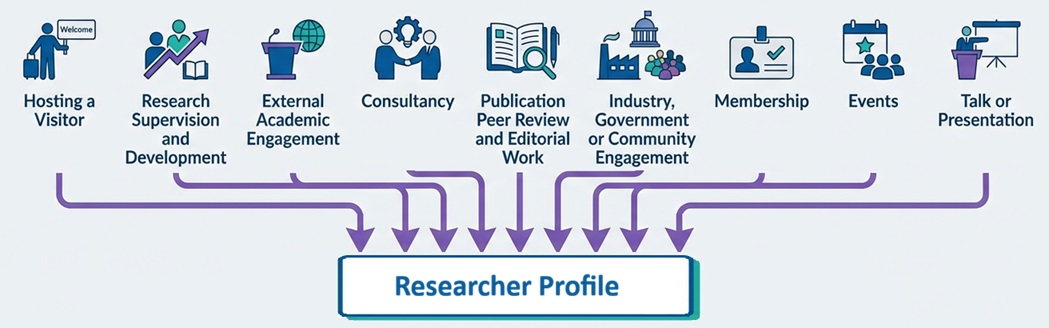
The Activities module captures nine categories of research activity:
- Hosting a Visitor – Domestic or international visitors to UNE for research collaboration
- Research Supervision and Development – Honours supervision, thesis examination, external HDR supervision, mentoring
- External Academic Engagement – Research visits, fellowships, sabbaticals, honorary affiliations
- Consultancy – Paid or formal unpaid expert advice to external organisations
- Publication Peer Review and Editorial Work – Manuscript review, editorial roles, conference proceedings
- Industry, Government or Community Engagement – Policy work, industry partnerships, public programs, expert testimony
- Membership – Professional associations, boards, committees, research networks
- Events – Conferences, workshops, exhibitions, public engagement events (as organiser or attendee)
- Talk or Presentation – Keynotes, invited talks, conference presentations, public lectures
View the full list of activity types and sub-categories (PDF)
No, entering your activities is voluntary. However, we encourage you to record your activities to build your comprehensive research profile and support your career development. Most activities take 2-5 minutes to enter. Simple activities (like a conference presentation) can take even less. Yes! You can edit or remove your activities at any time. Just navigate to the activity in your list and click "Edit" or "Delete". Contact us at research-performance@une.edu.au and we'll help find the right category or explore adding a new sub-type. No. Activities are for building your research profile and feeding into dashboards - they are NOT used for performance assessment or workload calculations. Yes! You can backfill activities from any timeframe. There's no restriction on dates. Don't feel you need to enter everything at once – we suggest you start with recent activities and work backwards when you have time. Yes! You can (and should) link activities to related publications, grants, or projects. This helps build a comprehensive narrative of your research work and makes it easier to demonstrate impact later. You control the visibility of each activity. You can make activities public (visible on your UNE researcher profile), confidential, or UNE-only. Publications (articles, books, chapters, NTROs) are managed separately and integrate from RUNE. Activities are everything else - presentations, supervision, engagement, awards, consultancies, etc. No, contact the Library: RUNE team about RUNE-PURE integration issues. Don't manually add publications as activities. No - UNE students are already captured in Callista (the student management system). The Activities Module is primarily for external students, visiting scholars, or other supervision that isn't in Callista. Yes, once you save an activity (and if you've set it to public visibility), it will appear on your PURE researcher profile and it will be visible to the public - once Profiles goes live for UNE. For technical or access issues, email pure-support@une.edu.au For content or "how to" questions, email research-performance@une.edu.au. When searching for your own name (e.g., when adding yourself as an editor, presenter, or contributor), you may see multiple versions of your name appear. Choose the entry that shows your current UNE affiliation. This is your internal UNE profile. Avoid selecting external or outdated entries. If you're unsure which entry to select, contact research-performance@une.edu.au for assistance.Frequently Asked Questions
